

Building a Homelab Cluster Out of Spare Parts
A few months ago this lab was one box. Now it’s four.
Not because I planned it that way — because that’s how homelabs actually grow. You start with something modest, you run out of headroom, a deal or a hand-me-down machine shows up, and suddenly you’re running a cluster instead of a server. Here’s how mine ended up at four Proxmox nodes, what each one does, and what I’d tell past-me if I could.
Here’s the current topology, end to end:
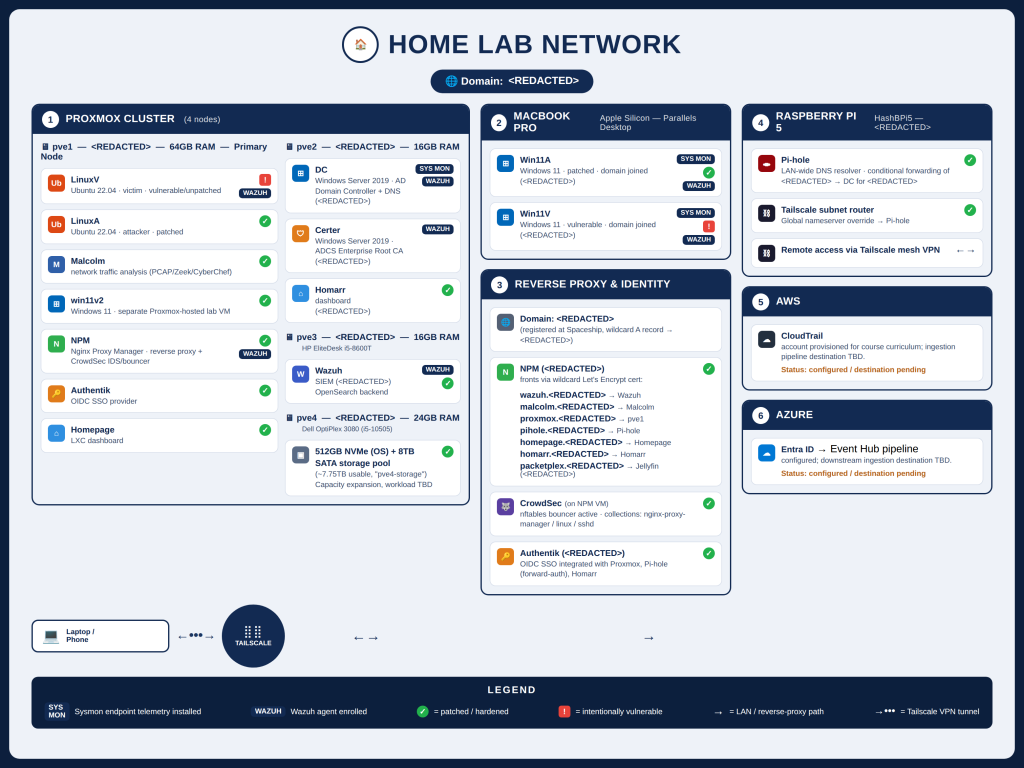
The cluster today
pve1 is the workhorse. 64GB of RAM (upgraded from 16GB once it became clear that attacker/victim VMs, detection tooling, and infrastructure services all wanted to live somewhere with room to breathe). This is where most of the “active” lab work happens — the machines I’m attacking, defending, and instrumenting day to day.
pve2 started life as a second small node and has since picked up part of the load for my Active Directory lab infrastructure. Not glamorous, but domain services need somewhere reliable to sit.
pve3 is dedicated to the SIEM. Wazuh lives here, by itself, on purpose — I didn’t want detection infrastructure competing for resources with the things it’s supposed to be watching.
pve4 is the newest addition: a Dell OptiPlex SFF with a 6-core/12-thread CPU, 24GB of RAM, a fast NVMe drive for the OS, and a separate ~8TB spinning disk bolted on purely for bulk storage. That extra storage is the real story here — it’s the first node in the cluster that isn’t storage-constrained, which opens the door to things I couldn’t seriously consider before (packet capture retention, bigger backup windows, storage-hungry tooling I’d been putting off).
Why a cluster instead of one bigger box
I get asked this occasionally, and the honest answer is: it wasn’t really a decision, it was an accumulation. Each node showed up for a different reason — a RAM upgrade here, a free machine there — and Proxmox clustering meant I didn’t have to choose between them. I got to keep all of it, manage it from one place, and assign work to whichever node made sense for the job.
There’s also a real benefit that only became obvious in hindsight: separation of concerns. Keeping the SIEM on its own node means a noisy VM on the attack range can’t starve the thing that’s supposed to be logging it. Keeping AD infrastructure semi-isolated means a bad Kerberoasting test doesn’t take down the domain controller I need for the nextten labs.
A word on sourcing hardware
Worth mentioning: some of this gear (like the RAM upgrade on pve1) was bought a while back, before AI-driven demand pushed memory and component prices up across the board. If I were buying that same RAM today, it’d cost noticeably more.
That price shift is exactly why pve4 came from eBay instead of a retail listing. Used office desktops and parts are still reasonably priced even as new hardware gets more expensive, and for a homelab, “reasonably priced and good enough” beats “brand new and justified” every time. I’d rather spend the savings on storage or a fifth node than on paying a premium for parts a homelab doesn’t need brand new.
What I’d do differently
If I were starting fresh, I’d think about storage a lot earlier than I did. Most of my nodes started life storage-constrained, and it wasn’t until pve4 showed up with real bulk storage that I realized how much that had been quietly limiting what labs I could even attempt — anything involving serious PCAP retention or large forensic images just wasn’t practical before.
I’d also plan hardware roles up front instead of backfilling them. Deciding “this node is for detection infrastructure, full stop” after the fact works, but it would have saved a few awkward VM migrations if I’d known from day one.
What’s next
With pve4’s storage in place, a few previously-shelved ideas are back on the table — things that needed real disk space I just didn’t have before. More on that as it comes together.
If you’re building something similar: go bigger than you think you’ll need, especially on storage, because you’ll grow into it faster than you expect. And don’t be afraid to run mismatched hardware — a cluster doesn’t care that one node is five years newer than another, it just wants nodes.
Full build notes, detection write-ups, and configs (sanitized) live in the public repo → github.com/davidbrown-sec/cybersecurity-homelab